Blogs

Tip Tuesday - How to Find Your Contributions on ADEA Connect

By Ms. Carolyn Vincent, CAE, AAiP posted 12-07-2021 09:44 AM

  
You can find the discussion posts and library items that you have contributed to the online community.  Follow the steps below to view your contributions.

Once you are logged into ADEA Connect:

1. Access your profile.  Click your user portal at the top-right of the screen, followed by Profile.
Profile image
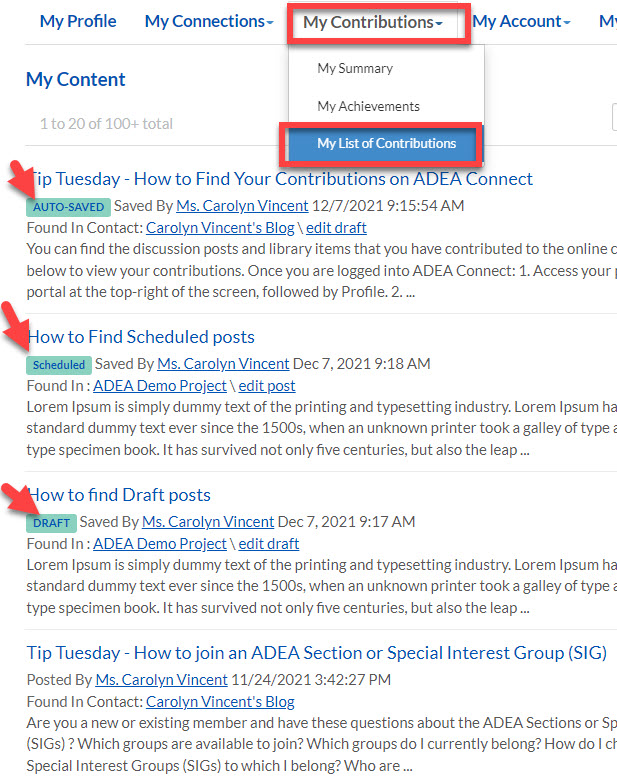
2. Click the 'My Contributions' tab  then 'My List of Contributions'.

This page shows all of your contributed content in a single scrollable list.  It makes it easy for you to view and access every piece of content you have contributed across your communities.

This page will also show any posts that have been automatically saved or saved as a draft and also discussion posts that have been scheduled to be delivered at a future date.

NOTE:  This page also shows any contributions that others in your community has sent IF you are a member of the same community.  Find the person in the member directory, click on their name and go to their  Contributions tab. 


My contributons information
 
Did you know that this feature was available?  Do you have questions?


Leave a comment below or reach out to me at communitymanager@adea.org.


Permalink